Controls Guide
⌨️ Mouse & Keyboard:
WASD Menu
- You can use WASD to navigate menus now.
Change Ammo Type
- Double tap R.
Change Shoulder Camera
- Press F or Middle Mouse Button whilst aiming to change shoulder camera view.
Realtime PipBoy Map
-
Hold Q to bring the map up.
-
Mouse Scroll Up/Down to zoom in/out on the map.
-
Press Middle Mouse Button to change map mode.
B42 Scopes:
- Use the Scroll Wheel to adjust zoom and TAB to adjust night vision on supported scopes.
Hold Breath
- Hold L-ALT to hold your breath whilst scoped.
Open Map
- Press M to open the pip-boy world map quicky.
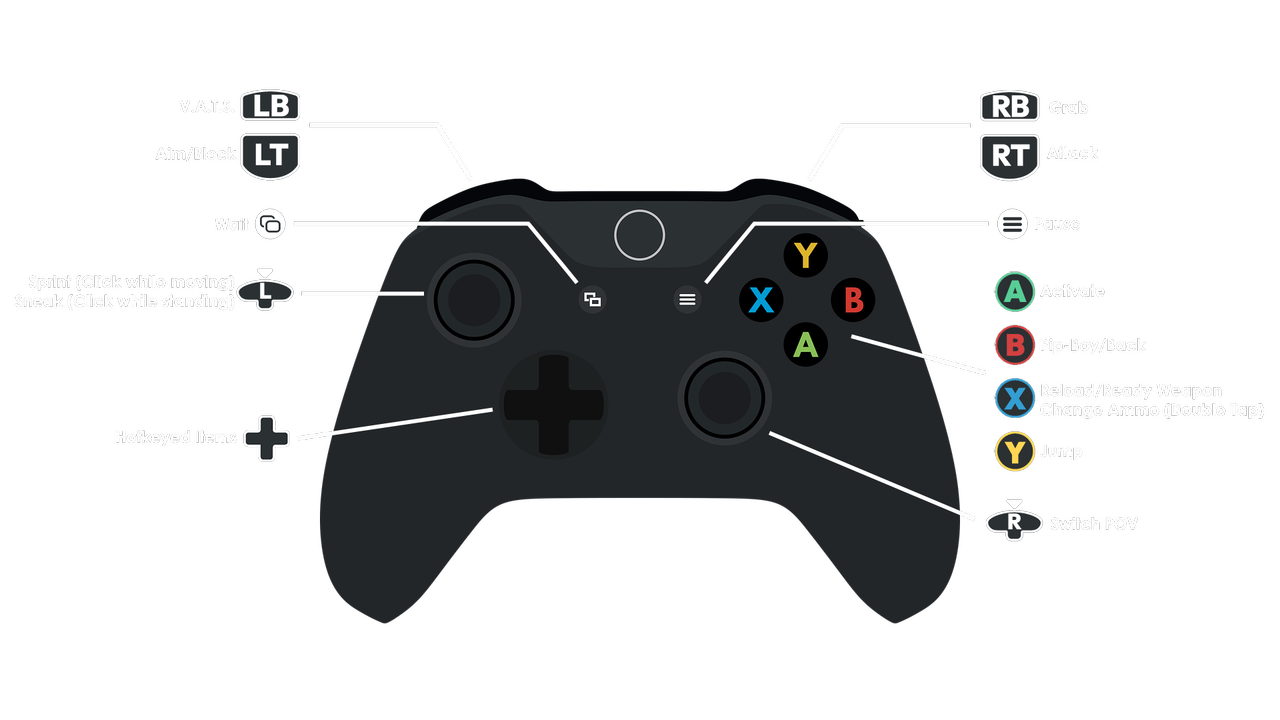
🎮 Controller:
You may want to enable the Soft-Lock Aim-Assist mod in the Tweaks, Configs & Patches separator in the left pane of MO2.
MEW uses a modernized control scheme that is closer to later titles like FO4.